Crystal's Windows support has been steadily getting more and more usable and with that comes the common question, "Can I create GUIs using Crystal on Windows?"; and the answer is... kind-of? Mostly yes!
I've been involved in the efforts to bring GTK to Crystal for years and I had the (dis)pleasure of bringing many complex and dependency-hellish apps to Windows, so I'd say I am qualified to write a quick guide on how to properly package said apps. Warning
Before I continue however, I have to add a warning. I am not a Windows user or developer, the following information comes from me being tasked with bringing apps to Windows and might not represent the 'best practices' for either Windows or GTK.
#Why is it so difficult to do this?
If you installed Crystal (or C or many other languages) on Windows you probably noticed how annoying installing dependencies on Windows is. The most convenient way, if you are coming from the unix world, is to use MSYS2.
MSYS2 is especially important for GTK (even though it's only one of the ways to get started) because you often have to use libraries and tools that expect a unix-like environment or only exist there. After all, the MSYS2 maintainers compile and test many libraries that their maintainers have never used outside of Linux.

While GTK (GLib and the whole ecosystem) is cross platform, the main focus is Linux and sometimes that entails bringing a Linux mindset when doing things outside of it. At the start I mentioned a complex and dependency-hellish app, Tuba. Tuba is written in Vala which doesn't really have an stdlib on its own, its stdlib is GLib. That means that it depends on many libraries, from parsing json to counting graphemes. Additionally, as an app it does a lot and has many runtime requirements like gstreamer for audio visualization, libspelling for spell checking and libsecret for securely saving passwords in a keyring. If Tuba was able to come to Windows then the workflow can be assumed to be somewhat battle-tested.
Lastly, since we don't have meson for Crystal, some tedious tasks have to be done manually but if you have followed my UGCG guide then it should be somewhat predictable.
#Let's get into it
#Dependencies
First of all, make sure you have installed MSYS2. This guide will focus on mingw64, but it's the same for the other archs. We are going to bring Collision to Windows. Pretty simple app since almost all the dependencies are Crystal stdlib or shards!
We need to collect our dependencies:
make, zip, wget, mingw-w64-x86_64-imagemagick: needed for the environment and packagingmingw-w64-x86_64-shards, mingw-w64-x86_64-gobject-introspection, mingw-w64-x86_64-crystal, mingw-w64-x86_64-pkg-config: Crystal, shards, OpenSSL, gi-crystalmingw-w64-x86_64-gtk4, mingw-w64-x86_64-libadwaita, mingw-w64-x86_64-gettext, mingw-w64-x86_64-desktop-file-utils: GTK, Libadwaita and ecosystem toolsmingw-w64-x86_64-libblake3: Collision dependency
MSYS2 uses pacman as its package manager, so the following command will update it and install our dependencies: .sh
.sh
$ pacman -Syyu git make zip wget mingw-w64-x86_64-desktop-file-utils mingw-w64-x86_64-imagemagick mingw-w64-x86_64-pkg-config mingw-w64-x86_64-libblake3 mingw-w64-x86_64-shards mingw-w64-x86_64-gobject-introspection mingw-w64-x86_64-crystal mingw-w64-x86_64-gtk4 mingw-w64-x86_64-libadwaita mingw-w64-x86_64-gettext
 Note
Note
You might be asked to restart MSYS2 after updating, do it and run the command again. You might also need to run the command multiple times until everything is installed, follow the on-screen instructions.
#Building
Now, like we'd do on Linux, we need to build the app!
$ shards install$ ./bin/gi-crystal.exe: Generate the bindings
Before we get into the next part, be ready to face issues. Crystal's Windows support is still not something most shards are aware of and they might not work. gi-crystal itself only gained support for it somewhat recently.
$ shards build -Dpreview_mt
...

It didn't work. The issue seems to be blake3, I have a forked shard for it (blake3.cr) which is responsible for building the correct variant using macros and C but I never tested for Windows and it doesn't seem to be able to. I would spend time fixing it but as we discovered, libblake3 is something MSYS2 packages so we don't have to.
$ BLAKE3_CR_DO_NOT_BUILD=1 shards build -Dpreview_mt
...
It still doesn't work? This time it's an issue with the run macro for the licenses.cr script, it errors without any output. Running it from eval works. Welp, not time to waste on this, let's skip the file (I'll file an issue if I manage to make a reproducer). {% skip_file if flag?(:windows) %}
$ BLAKE3_CR_DO_NOT_BUILD=1 shards build -Dpreview_mt$ ./bin/collision.exe

Aaaaand here it is in all its glory:
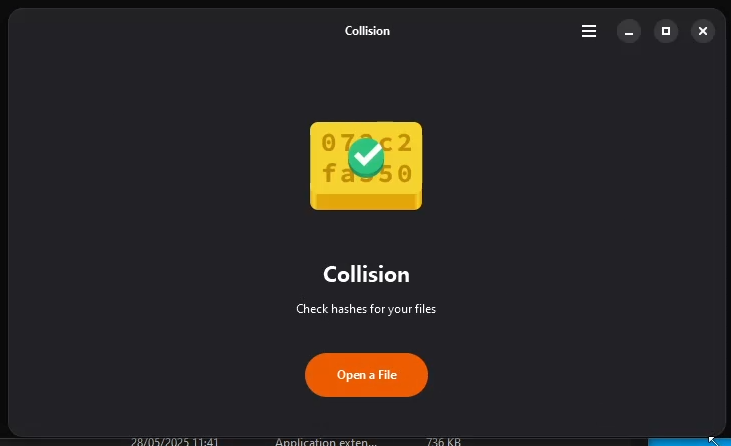
At this point you need to start testing your app. Collision doesn't work fully. It can't finish calculating hashes. I can only assume this has to do with fibers, after all multi-threading is still experimental, so I'll leave it at that for now.
#Packaging
Your app works great on Windows! You can share it online and send it to customers and... oh, it doesn't work outside of MSYS2...
You might think this has something to do with shared dependencies and you are right, but before you think about statically linking them (ignoring the licensing issues), let me tell you that it's not going to work. It's not just the dependencies. You need to include all the icons your app might use, all gschemas, all image decoders, all translations etc.
What we need to do is properly package it - we need to re-create the same structure it would have if it was installed on Linux and include everything it will need. We will add a windows target to the makefile and I'll explain it in sections:
- This will be our playground. Imagine as if you are re-creating
/usr; our app will live at /bin.
Makefile
windows:
#	reset folder
	rm -rf "collision_windows"
	mkdir -p "collision_windows/bin"
	mkdir -p "collision_windows/share/applications"
	mkdir -p "collision_windows/share/glib-2.0/schemas"
	mkdir -p "collision_windows/share/icons"
	mkdir -p "collision_windows/share/locale"
- Compile and move the app there. The env vars are for Collision only, not needed by all apps.
Makefile
#	compile your app and move it to the folder
	BLAKE3_CR_DO_NOT_BUILD=1 COLLISION_LOCALE_LOCATION=".$(LOCALE_LOCATION)" $(CRYSTAL_LOCATION)shards build -Dpreview_mt --release --no-debug
	mv ./bin/collision.exe ./collision_windows/bin/dev.geopjr.Collision.exe
- To set the icon on the executable, we need to use a third party tool and rsvg-convert + imagemagick to turn the svg into a
.ico file.
Makefile
#	set the exe icon from the svg
	wget -nc https://github.com/electron/rcedit/releases/download/v1.1.1/rcedit-x64.exe
	rsvg-convert ./data/icons/dev.geopjr.Collision.svg -o ./data/icons/dev.geopjr.Collision.png -h 256 -w 256
	magick -density "256x256" -background transparent ./data/icons/dev.geopjr.Collision.png -define icon:auto-resize -colors 256 ./data/icons/dev.geopjr.Collision.ico
	./rcedit-x64.exe ./collision_windows/bin/dev.geopjr.Collision.exe --set-icon ./data/icons/dev.geopjr.Collision.ico
- Now's the difficult part. Gathering all the dependencies and their dependencies and copying them over. This consists of running
ldd on our executable, grepping all the mingw64 libraries and copying them over, on repeat until there's none left. Then manually copy over any other tools or runtime dependencies and do the same thing on them. You might not need everything but the only way to know is by running your app and see what doesn't work.
Makefile
#	copy all dependencies and their dependencies to the folder
#	this depends on what your app does and depends on - even on runtime
	ldd ./collision_windows/bin/dev.geopjr.Collision.exe | grep '\/mingw64.*\.dll' -o | xargs -I{} cp "{}" ./collision_windows/bin
	cp -f /mingw64/bin/gdbus.exe ./collision_windows/bin && ldd ./collision_windows/bin/gdbus.exe | grep '\/mingw64.*\.dll' -o | xargs -I{} cp "{}" ./collision_windows/bin
	cp -f /mingw64/bin/gspawn-win64-helper.exe ./collision_windows/bin && ldd ./collision_windows/bin/gspawn-win64-helper.exe | grep '\/mingw64.*\.dll' -o | xargs -I{} cp "{}" ./collision_windows/bin
	cp -f /mingw64/bin/librsvg-2-2.dll /mingw64/bin/libgthread-2.0-0.dll /mingw64/bin/libgmp-10.dll ./collision_windows/bin
	cp -r /mingw64/lib/gio/ ./collision_windows/lib
	cp -r /mingw64/lib/gdk-pixbuf-2.0 ./collision_windows/lib/gdk-pixbuf-2.0

	ldd ./collision_windows/lib/gio/*/*.dll | grep '\/mingw64.*\.dll' -o | xargs -I{} cp "{}" ./collision_windows/bin
	ldd ./collision_windows/bin/*.dll | grep '\/mingw64.*\.dll' -o | xargs -I{} cp "{}" ./collision_windows/bin
	ldd ./collision_windows/lib/gdk-pixbuf-2.0/*/loaders/*.dll | grep '\/mingw64.*\.dll' -o | xargs -I{} cp "{}" ./collision_windows/bin
- Afterwards, we need to compile all the schemas, including Collision's, translations (if any) and other metadata.
Makefile
#	Copy and compile all schemas
	cp -r /mingw64/share/glib-2.0/schemas/*.xml ./collision_windows/share/glib-2.0/schemas/
	cp ./data/dev.geopjr.Collision.gschema.xml ./collision_windows/share/glib-2.0/schemas/
	glib-compile-schemas.exe ./collision_windows/share/glib-2.0/schemas/

#	Compile and copy all translations (this is the same as UGCG but different install location)
	mkdir -p $(PO_LOCATION)/mo
	for lang in `cat "$(PO_LOCATION)/LINGUAS"`; do \
		if [[ "$$lang" == 'en' || "$$lang" == '' ]]; then continue; fi; \
		mkdir -p "./collision_windows$(LOCALE_LOCATION)/$$lang/LC_MESSAGES"; \
		msgfmt "$(PO_LOCATION)/$$lang.po" -o "$(PO_LOCATION)/mo/$$lang.mo"; \
		install -D -m 0644 "$(PO_LOCATION)/mo/$$lang.mo" "./collision_windows$(LOCALE_LOCATION)/$$lang/LC_MESSAGES/dev.geopjr.Collision.mo"; \
	done
#	Translate and copy the desktop file (probably not needed)
	msgfmt --desktop --template data/dev.geopjr.Collision.desktop.in -d "$(PO_LOCATION)" -o ./collision_windows/share/applications/dev.geopjr.Collision.desktop
- Lastly, we need to copy over all icons. That's because we don't know what the app will use, GTK uses some, libadwaita uses some others, we use some others. Technically, we could just include only those we actually use but it requires keeping track of them (including the libraries and their future versions). Instead we copy over everything and we clean up afterwards (also other non-icon stuff).
Makefile
#	Copy all icons
	cp -r /mingw64/share/icons/ ./collision_windows/share/

#	Cleanup
	rm -f ./collision_windows/share/glib-2.0/schemas/*.xml # Schema files were compiled already
	rm -rf ./collision_windows/share/icons/hicolor/scalable/actions/ # not needed
	find ./collision_windows/share/icons/ -name *.*.*.svg -not -name *geopjr* -delete # Delete third-party app icons
	find ./collision_windows/lib/gdk-pixbuf-2.0/2.10.0/loaders -name *.a -not -name *geopjr* -delete # Delete unnecessary files
	find ./collision_windows/share/icons/ -name mimetypes -type d  -exec rm -r {} + -depth # We don't need mimetype icons
	find ./collision_windows/share/icons/hicolor/ -path */apps/*.png -not -name *geopjr* -delete
	find ./collision_windows/ -type d -empty -delete # Delete empty folders
	gtk-update-icon-cache ./collision_windows/share/icons/Adwaita/ # Regen icon cache
	gtk-update-icon-cache ./collision_windows/share/icons/hicolor/ # Regen icon cache
And that's all! Your app should now be self-contained. You can zip it $ zip -r9q collision_windows.zip collision_windows/ and share it. You can move a step further and create an installer for it but that's a guide on its own.
The full Makefile target:Makefile
windows:
#	reset folder
	rm -rf "collision_windows"
	mkdir -p "collision_windows/bin"
	mkdir -p "collision_windows/share/applications"
	mkdir -p "collision_windows/share/glib-2.0/schemas"
	mkdir -p "collision_windows/share/icons"
	mkdir -p "collision_windows/share/locale"

#	compile your app and move it to the folder
	BLAKE3_CR_DO_NOT_BUILD=1 COLLISION_LOCALE_LOCATION=".$(LOCALE_LOCATION)" $(CRYSTAL_LOCATION)shards build -Dpreview_mt --release --no-debug
	mv ./bin/collision.exe ./collision_windows/bin/dev.geopjr.Collision.exe

#	set the exe icon from the svg
	wget -nc https://github.com/electron/rcedit/releases/download/v1.1.1/rcedit-x64.exe
	rsvg-convert ./data/icons/dev.geopjr.Collision.svg -o ./data/icons/dev.geopjr.Collision.png -h 256 -w 256
	magick -density "256x256" -background transparent ./data/icons/dev.geopjr.Collision.png -define icon:auto-resize -colors 256 ./data/icons/dev.geopjr.Collision.ico
	./rcedit-x64.exe ./collision_windows/bin/dev.geopjr.Collision.exe --set-icon ./data/icons/dev.geopjr.Collision.ico

#	copy all dependencies and their dependencies to the folder
#	this depends on what your app does and depends on - even on runtime
	ldd ./collision_windows/bin/dev.geopjr.Collision.exe | grep '\/mingw64.*\.dll' -o | xargs -I{} cp "{}" ./collision_windows/bin
	cp -f /mingw64/bin/gdbus.exe ./collision_windows/bin && ldd ./collision_windows/bin/gdbus.exe | grep '\/mingw64.*\.dll' -o | xargs -I{} cp "{}" ./collision_windows/bin
	cp -f /mingw64/bin/gspawn-win64-helper.exe ./collision_windows/bin && ldd ./collision_windows/bin/gspawn-win64-helper.exe | grep '\/mingw64.*\.dll' -o | xargs -I{} cp "{}" ./collision_windows/bin
	cp -f /mingw64/bin/librsvg-2-2.dll /mingw64/bin/libgthread-2.0-0.dll /mingw64/bin/libgmp-10.dll ./collision_windows/bin
	cp -r /mingw64/lib/gio/ ./collision_windows/lib
	cp -r /mingw64/lib/gdk-pixbuf-2.0 ./collision_windows/lib/gdk-pixbuf-2.0

	ldd ./collision_windows/lib/gio/*/*.dll | grep '\/mingw64.*\.dll' -o | xargs -I{} cp "{}" ./collision_windows/bin
	ldd ./collision_windows/bin/*.dll | grep '\/mingw64.*\.dll' -o | xargs -I{} cp "{}" ./collision_windows/bin
	ldd ./collision_windows/lib/gdk-pixbuf-2.0/*/loaders/*.dll | grep '\/mingw64.*\.dll' -o | xargs -I{} cp "{}" ./collision_windows/bin

#	Copy and compile all schemas
	cp -r /mingw64/share/glib-2.0/schemas/*.xml ./collision_windows/share/glib-2.0/schemas/
	cp ./data/dev.geopjr.Collision.gschema.xml ./collision_windows/share/glib-2.0/schemas/
	glib-compile-schemas.exe ./collision_windows/share/glib-2.0/schemas/

#	Compile and copy all translations
	mkdir -p $(PO_LOCATION)/mo
	for lang in `cat "$(PO_LOCATION)/LINGUAS"`; do \
		if [[ "$$lang" == 'en' || "$$lang" == '' ]]; then continue; fi; \
		mkdir -p "./collision_windows$(LOCALE_LOCATION)/$$lang/LC_MESSAGES"; \
		msgfmt "$(PO_LOCATION)/$$lang.po" -o "$(PO_LOCATION)/mo/$$lang.mo"; \
		install -D -m 0644 "$(PO_LOCATION)/mo/$$lang.mo" "./collision_windows$(LOCALE_LOCATION)/$$lang/LC_MESSAGES/dev.geopjr.Collision.mo"; \
	done
#	Translate and copy the desktop file (probably not needed)
	msgfmt --desktop --template data/dev.geopjr.Collision.desktop.in -d "$(PO_LOCATION)" -o ./collision_windows/share/applications/dev.geopjr.Collision.desktop

#	Copy all icons
	cp -r /mingw64/share/icons/ ./collision_windows/share/

#	Cleanup
	rm -f ./collision_windows/share/glib-2.0/schemas/*.xml
	rm -rf ./collision_windows/share/icons/hicolor/scalable/actions/
	find ./collision_windows/share/icons/ -name *.*.*.svg -not -name *geopjr* -delete
	find ./collision_windows/lib/gdk-pixbuf-2.0/2.10.0/loaders -name *.a -not -name *geopjr* -delete
	find ./collision_windows/share/icons/ -name mimetypes -type d  -exec rm -r {} + -depth
	find ./collision_windows/share/icons/hicolor/ -path */apps/*.png -not -name *geopjr* -delete
	find ./collision_windows/ -type d -empty -delete
	gtk-update-icon-cache ./collision_windows/share/icons/Adwaita/
	gtk-update-icon-cache ./collision_windows/share/icons/hicolor/

#	Package
	zip -r9q collision_windows.zip collision_windows/